Have you ever written an idea down, come back to it a few days later, and not known how to turn it into a paragraph? It happens to most of the people who write in their daily life. You know what you meant, but putting it into words that really make sense to someone else is the hard part.
AI tools can be very helpful here, but many do not know how to properly utilize them. When you provide an AI chatbot with a general input, it will provide you with a paragraph that is just as general and includes terms such as "game-changing" and "crucial." But when you provide a detailed sentence, you get a much better result.
The following is a brief four-step guide that you can apply to essays, blogs and project reports. We will provide one example throughout all the steps.
Why Rough Ideas Stall
Rough ideas make sense to you because you already know the background. You know why you think the idea is true, you have an example in mind, and you know where it fits in your article.
Your reader doesn't know any of that. They only read what is actually stated on the paper.
That is why there are usually three elements needed to turn a rough idea into a paragraph: a reason why this idea makes sense, an example that illustrates its real meaning, and finally the relation to other parts of the text.
It is quite hard to do everything together and think about grammar, tone and the number of words at the same time; and this problem can be solved through breaking this process into smaller pieces, and here artificial intelligence may help.
Step 1: Describe the Idea in One Simple Sentence
Before using any tool, describe your idea in one sentence. Not several keywords, and not some kind of half-sentence
that ends with a question mark.
It seems to be pretty easy, but in fact it is important because if you can't formulate your idea in one sentence, it
means that you have not determined your central idea yet, and the software will not do it for you.
Here's the note we'll use as our example:
python first, then ML?
If you were to write it as a complete sentence, it would read as:
“Python is a good first language for anyone learning machine learning.”
It is a simple sentence, but it is straightforward, and you now have an idea in your mind of what your paragraph will be about. To find out whether you are ready to go ahead, just think if the sentence will help you to respond if someone asks, "What is your point?"
Step 2: Add Depth to the Sentence
In this step, you have to provide more information on the sentence that you've created. This isn't about adding extra words. It's about writing down the reason and the example you already have in your head.
Ask yourself two questions. The first is, why is this true? For our example, it's because Python's syntax is easy to read, and the main machine learning libraries are built for it. The second is, what's the proof? Libraries like pandas and scikit-learn are used in most beginner machine learning courses.
If you already know the answers, just add them to the sentence yourself. If you know what you want to say but can’t get the wording right, try a sentence expander . Paste in your sentence and it will rewrite it with more detail, without changing what you meant. It gives you three variants, so you can compare them with your own sentence and keep whichever sounds better, or mix the best parts of both. It’s free and there’s no sign-up, so you can try a few versions in a couple of minutes.
Two settings are worth changing before you click Expand Text. Under Words to Expand, choose the custom option and type
50. The other options of 200, 400 and 600 words are better for longer pieces of text, and for a single sentence
you only want a little extra detail. Then choose a tone. Standard works for most blog posts, while Formal or
Professional is better for essays and reports.
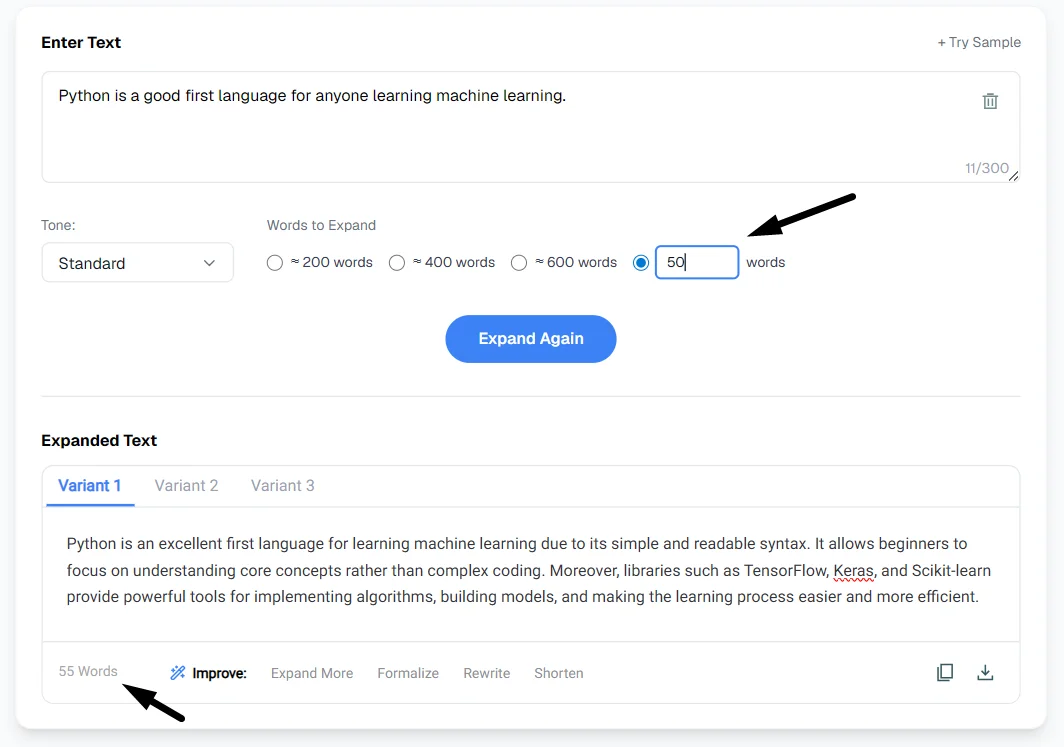
The result should look like this:
“Python is an excellent first language for learning machine learning due to its simple and readable syntax. It allows beginners to focus on understanding core concepts rather than complex coding. Moreover, libraries such as TensorFlow, Keras, and Scikit-learn provide powerful tools for implementing algorithms, building models, and making the learning process easier and more efficient.”
Read it once more and check that it still says what you meant. If any part of it doesn't sound like you, change it or remove it.
Step 3: Write the Paragraph Based on It
Now with a detailed sentence ready to use, you can easily write the full paragraph with that sentence. A good paragraph usually has four parts: the main point, the reason behind it, an example, and a closing sentence that links back to your topic or leads into the next paragraph.
You can write this yourself, and it gets easier with practice. But when you have a deadline or several sections to write, a paragraph generator can give you a good first draft in a few seconds.
What you type in the input box is the most important. You enter a more basic query, such as “Python machine learning”, and you'll receive a generic paragraph that might be on any site. Paste your detailed sentence from Step 2 instead. In the screenshot below, we used a shorter, edited version of it. It already contains your reason and your example, so the draft stays focused on your point.
In this example, select Simple style, which is good for explanations, notes, etc. Persuasive works for an argument;
and the More menu offers Academic, Formal and Professional for school or work writing. Next click Format and choose
Paragraph, Count to 1 and length Concise. A short draft is easier to edit than a long one, and you can switch to
Detailed if you need more. If you don't like the first result, click Generate Paragraph again to get a new version.
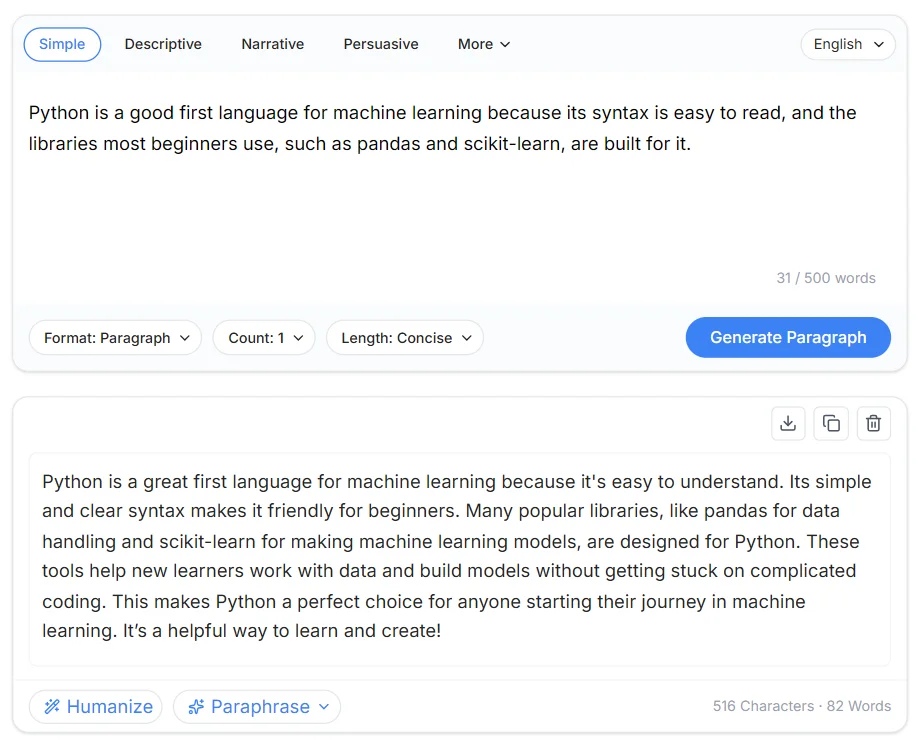
Here’s the draft the paragraph generator gave us:
“Python is a great first language for machine learning because it's easy to understand. Its simple and clear syntax makes it friendly for beginners. Many popular libraries, like pandas for data handling and scikit-learn for making machine learning models, are designed for Python. These tools help new learners work with data and build models without getting stuck on complicated coding. This makes Python a perfect choice for anyone starting their journey in machine learning. It’s a helpful way to learn and create!”
Compare that with the note we started with, python first, then ML? The idea is the same, but now it has a reason, an example and a clear ending.
Step 4: Edit the Draft into Your Own Voice
Most people usually ignore this stage, but it is the most essential one. The AI-generated draft gives the paragraph its structure. Editing is what makes the paragraph sound like you, and it’s also how you catch any mistakes.
First, read the paragraph out loud. If a sentence feels or sounds weird, rewrite it the way you would write it.
Secondly, remove filler statements like “crucial”, “in today’s fast-paced world” and “plays a vital role”. They add no value to the sentence yet lengthen it. In most cases, the sentence looks more effective without them.
Third, check all of the facts. AI chatbots or tools get things wrong sometimes, and they won’t tell you when they do. If your paragraph mentions a library, a number or a date, always double check them properly.
Fourth, add something from your personal experience, like a project you worked on in the past, a problem you solved or a result you got. This is an element that a tool cannot write and will be remembered by your readers.
Finally, read the final paragraph together with the paragraphs around it, and make sure it fits the rest of your article as well.
For instance, in our example, the last sentence, “It’s a helpful way to learn and create!”, is very generic. If you replace it with your personal experience, such as the first dataset you worked with, then your paragraph will become more relevant.
Common Mistakes to Avoid
Here are some of the common mistakes that will ruin your paragraph even if you follow the tips written above.
Starting with keywords instead of a sentence
Entering terms such as "Python ML beginners" will most probably return a generic paragraph to you. It should be remembered that any AI tool requires data to process, so bad input produces bad output. It is equally valid in the case of chatbots and writing assistants. In order to learn how to give better instructions to AI, this ChatGPT prompt engineering tutorial describes how wording influences response.
Adding too much detail
It is not true that a sentence must be long to be effective. If you find that the extended sentence now discusses three topics, reduce it to just one topic and one supporting argument.
Using the first result
Your first try is almost never going to be your best. Try to come up with two or three versions, compare them and combine what's best from each one. It won't take more than a minute and will surely make a difference.
Not checking the facts
AI tools may suggest some fictional elements, from a nonexistent feature to some made-up statistics. Regardless of whether you're working on an academic paper, creating content for a client or even blogging, one wrong fact may cause your audience to doubt the rest of your work.
Losing your own voice
When all of your paragraphs sound perfect yet none of them sounds like you, readers will definitely notice. Stick to your style, examples and personal opinions.
Conclusion
To turn a rough idea into a full paragraph, write it as one simple sentence, add a reason and an example, build the paragraph around it, and then edit it to make sure that it is natural and sounds like you.
AI tools are particularly useful in steps two and three since these are the stages that pose difficulties for most
people. However, they cannot decide on what you wish to express. The clearer your first sentence is, the better your
results will be, and the less you’ll have to fix later.
Next time you’re looking at a note that just says python first, then ML?, don’t try to write the whole paragraph in
one go. Start with just one clear and simple sentence and build from there.